> ## Documentation Index
> Fetch the complete documentation index at: https://docs.libratech.ai/llms.txt
> Use this file to discover all available pages before exploring further.

# Discovery basics

> Ask the same questions across many documents at once. Get a comparable, structured table of answers, with citations.

<video autoPlay muted loop playsInline src="https://mintcdn.com/libra-4206ec93/azhR9hqtFjs66ITC/assets/videos/features/discovery-basics.webm?fit=max&auto=format&n=azhR9hqtFjs66ITC&q=85&s=1c4528d23f1c04962695f8667f9f2de6" className="rounded-xl border w-full" data-path="assets/videos/features/discovery-basics.webm" />

A **Discovery** lets you ask the same questions across a large set of documents and get a structured table back: one row per document, one column per question. Where [Review](/en/features/review/basics) measures a document set against a **Playbook** and reports risk, Discovery answers *"how do these many documents compare?"*

<Note>
  Discovery is a **Professional** feature, and you need edit rights in the project you're working in. On the **Starter** plan the **Discovery** section still opens, but **New Discovery** is disabled, an upgrade prompt takes the place of your saved templates and of the Discovery list, and the **Libra** templates are still listed but can't be run. On some restricted deployments Discovery is switched off entirely, and the project section of the sidebar shows neither **Review** nor **Discovery**.
</Note>

<div className="libra-buddy-callout">
  <img src="https://mintcdn.com/libra-4206ec93/wgVZXcGnHS4aJk9T/assets/images/libra-buddy/presenting.png?fit=max&auto=format&n=wgVZXcGnHS4aJk9T&q=85&s=db41075b4a259a172f68465ae5c3421e" alt="Libra mascot presenting" width="827" height="615" data-path="assets/images/libra-buddy/presenting.png" />

  <div className="libra-buddy-callout-content">
    Add columns one at a time to a finished Discovery. A new column is filled in across the rows you already have, and the answers in the other columns are kept — so you iterate without re-paying for what worked.
  </div>
</div>

## What's in a Discovery

| Element      | What it is                                                                                                                                                                                  |
| ------------ | ------------------------------------------------------------------------------------------------------------------------------------------------------------------------------------------- |
| **Columns**  | The questions. Each column has a label, an answer type — **Text**, **Yes/No**, **Number**, **Date**, **Currency** or **Bullet List** — and an optional prompt spelling out what to extract. |
| **Rows**     | The documents Libra analyses. Each document becomes its own row, unless you deliberately fold several files into one.                                                                       |
| **Cells**    | The answer for one document–column pair, together with Libra's reasoning and its citations back into the document.                                                                          |
| **Template** | A saved set of columns, so a Discovery you've tuned can be run again on the next set of files.                                                                                              |

A Discovery belongs to the project you create it in, and stays there: you'll find it again in the **Discoveries** folder under **Project files**, and in the Discovery list.

## When to use Discovery
<Columns cols={2}>
  <Card title="Compare provisions across many contracts" icon="layers">
    *"Show me notice periods across our 200 service agreements."*
  </Card>

  <Card title="Extract data from a document set" icon="table">
    *"Pull party names, signing dates, and contract values from this folder of NDAs."*
  </Card>

  <Card title="Spot inconsistencies in a portfolio" icon="search">
    *"Find leases where the rent escalation isn't in line with our standard."*
  </Card>

  <Card title="Build summaries of large stacks of documents" icon="file-text">
    *"Summarise the key obligations across these 50 employment contracts."*
  </Card>
</Columns>

To measure documents against your own standard rather than compare them with each other, use [Review](/en/features/review/basics). For open-ended questions about a handful of files, use [Chat](/en/features/chat/basics).

## How Discovery works

<Steps>
  <Step title="Define the columns">
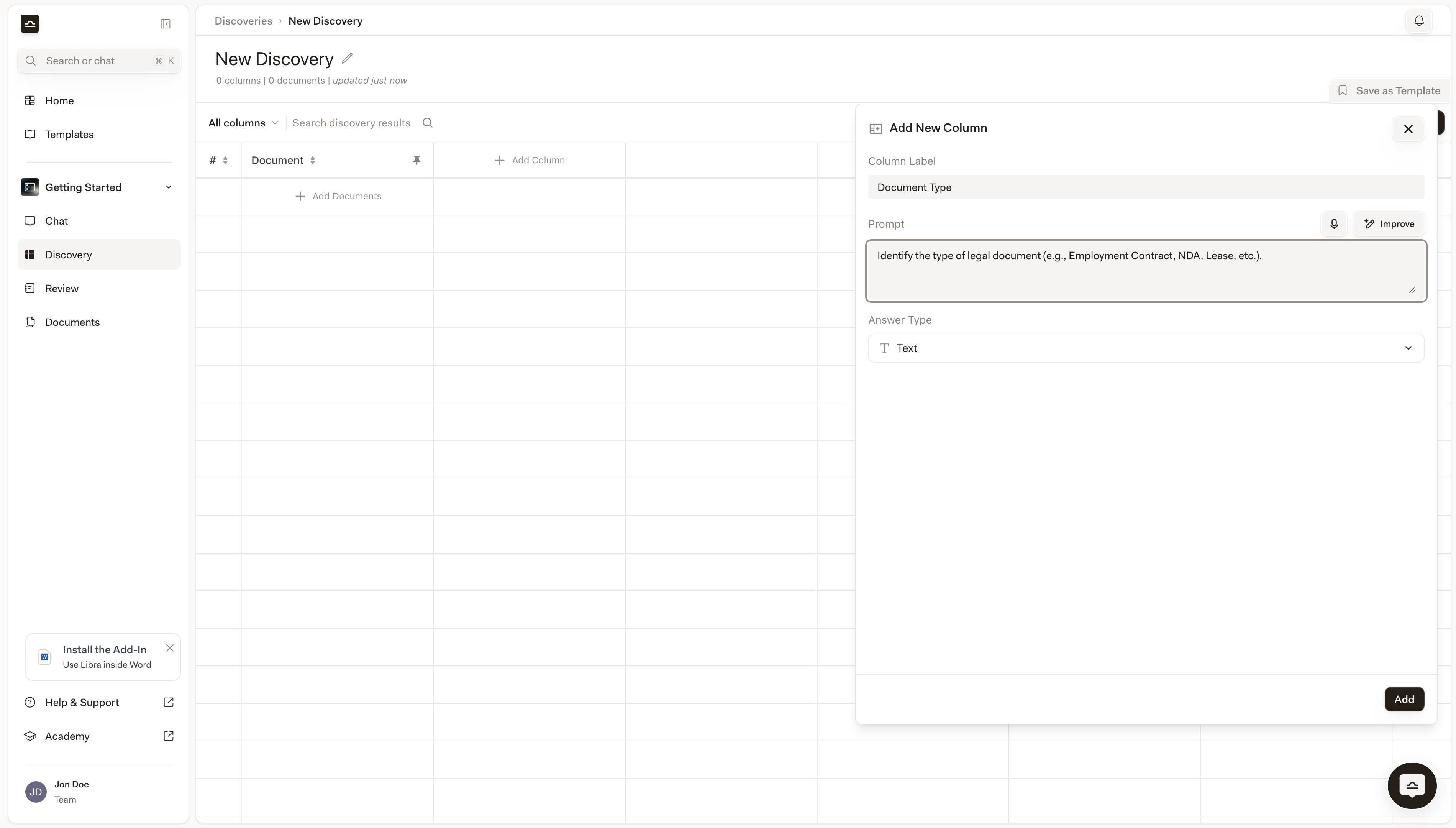
    **Add Column** opens the **Add New Column** panel. A column needs a **Column Label** (the header text) and an **Answer Type**, which decides how the cell is rendered and how the column sorts. The **Prompt** is optional, but the more specific it is — *"Identify the notice period for termination, in days"* — the better the extraction.

    <img src="https://mintcdn.com/libra-4206ec93/DvY4COCBKazHNw7v/assets/images/app/discovery-add-column.png?fit=max&auto=format&n=DvY4COCBKazHNw7v&q=85&s=66ed9d2d18b2f26634a659ec54f8fb38" alt="Add New Column panel with Column Label, Prompt and Answer Type fields" width="3800" height="2160" data-path="assets/images/app/discovery-add-column.png" />
  </Step>

  <Step title="Add the documents">
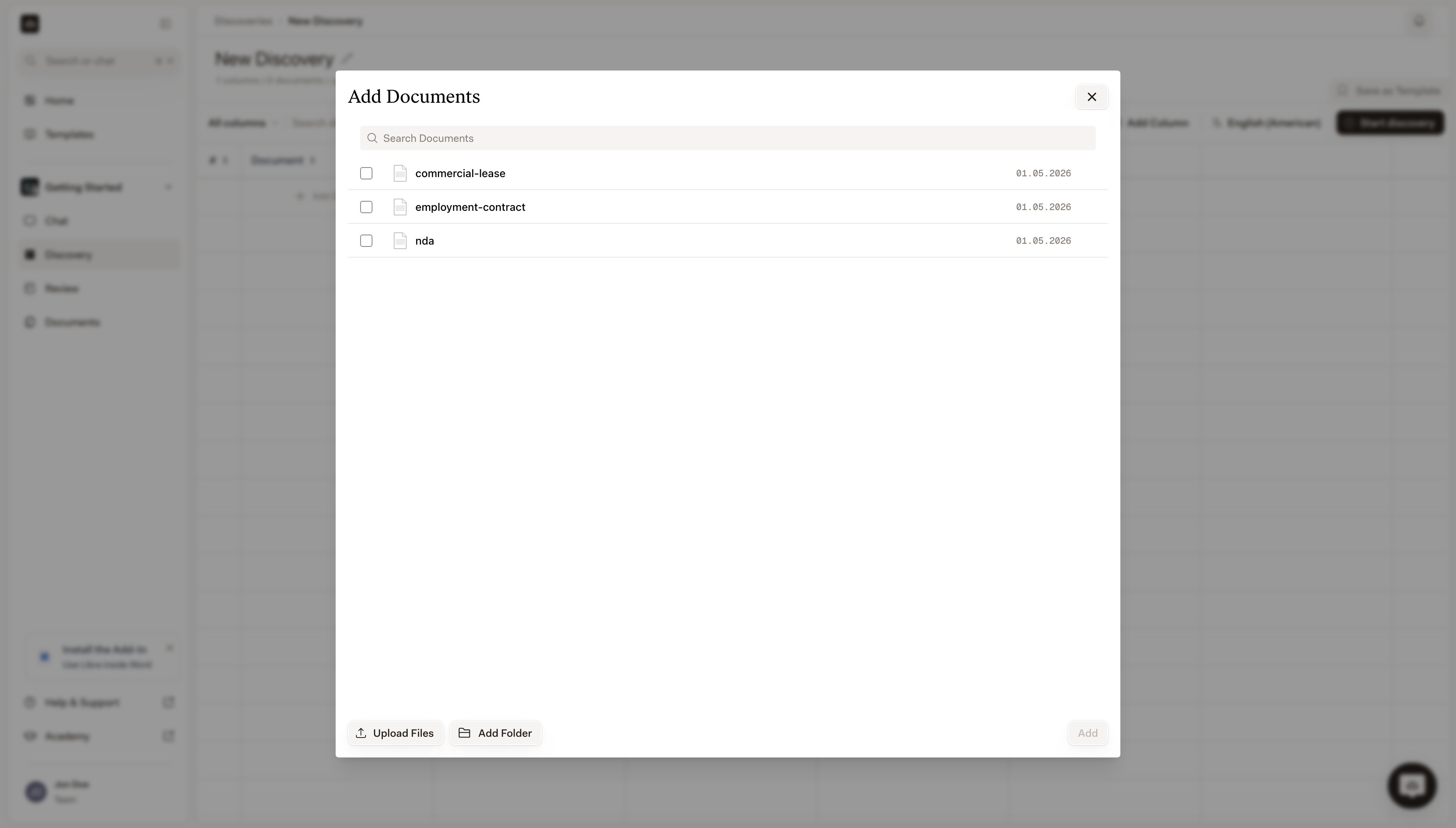
    **Add Documents** opens a picker over the project's **Project files**; **Upload Files** and **Upload Folders** bring in new material. Each file you select becomes its own row, or you can fold a whole selection into a single row when several files are really one matter — a contract and its annexes, say.

    <img src="https://mintcdn.com/libra-4206ec93/DvY4COCBKazHNw7v/assets/images/app/discovery-document-picker.png?fit=max&auto=format&n=DvY4COCBKazHNw7v&q=85&s=29bab7b9cde9cb1d56f49de993bd131f" alt="Add Documents picker listing the project's files, with Upload Files at the bottom" width="3800" height="2160" data-path="assets/images/app/discovery-document-picker.png" />
  </Step>

  <Step title="Run it">
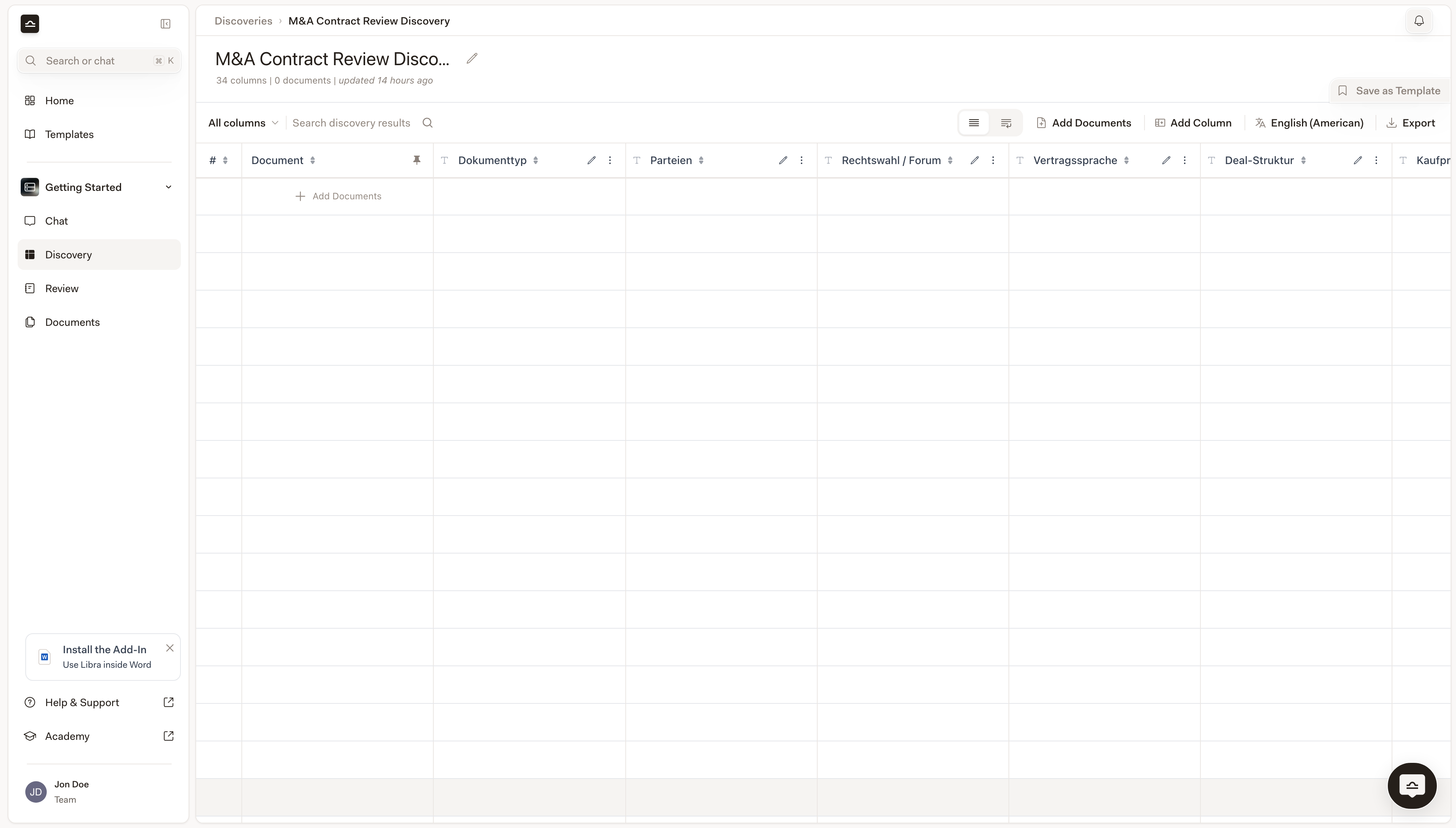
    **Start discovery** needs at least one document and at least one column. Cells fill in as Libra works through the table, with a progress bar under the title. The extraction runs on Libra's side, so you can leave the page and come back to a finished table; **Cancel** stops a run you no longer want. If you stay on the page, a **Discovery completed** badge appears in the toolbar for a moment as the last cells land.

    <img src="https://mintcdn.com/libra-4206ec93/DvY4COCBKazHNw7v/assets/images/app/discovery-in-progress.png?fit=max&auto=format&n=DvY4COCBKazHNw7v&q=85&s=f47e37894ef672f1888184356ac4453a" alt="An empty Discovery table with its columns defined and no documents added yet" width="3800" height="2160" data-path="assets/images/app/discovery-in-progress.png" />
  </Step>

  <Step title="Verify and refine">
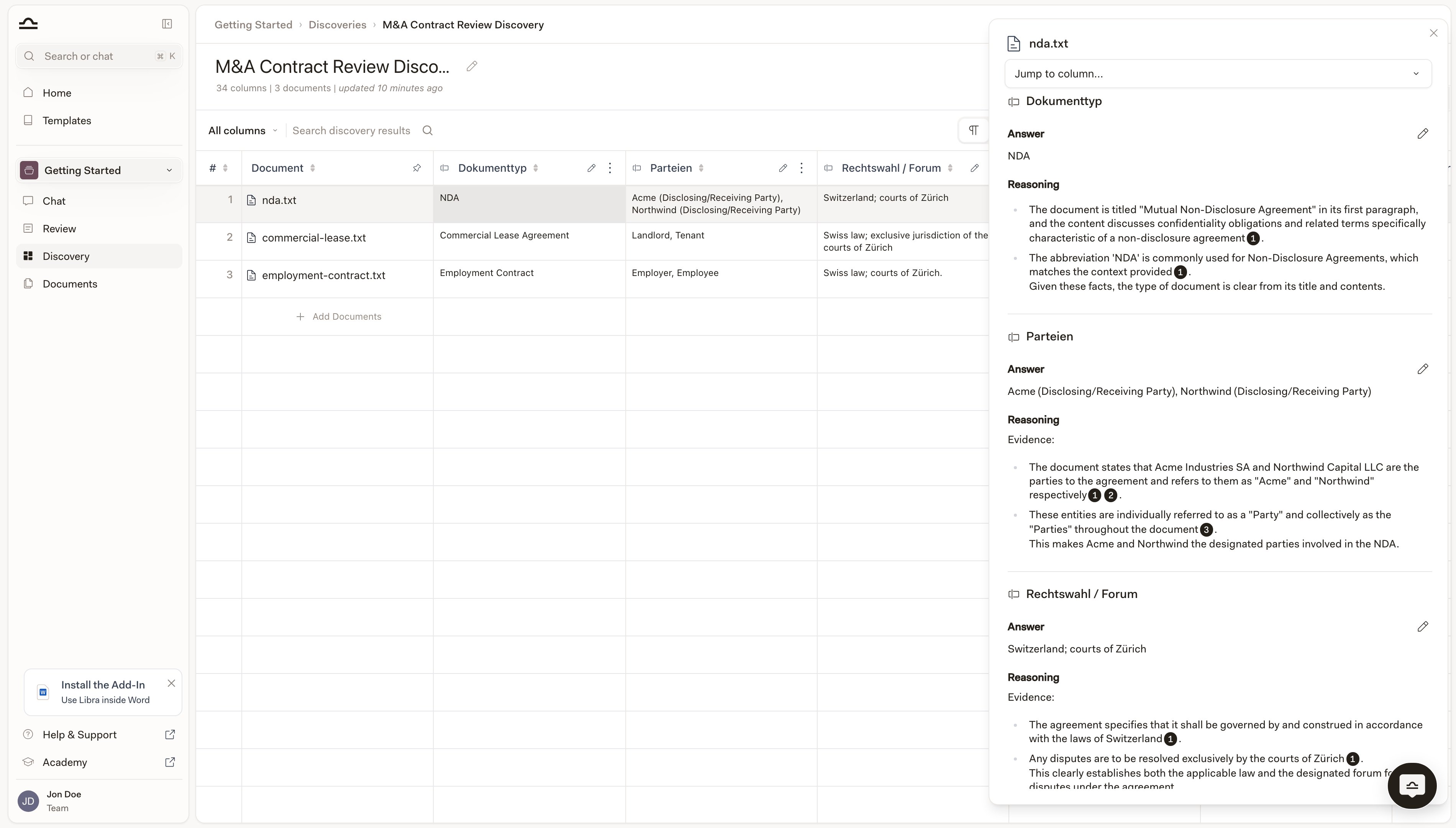
    Click any cell and a panel opens on the right, headed with the document name and covering every column for that row. Each block shows the **Answer** and the **Reasoning** behind it, with numbered citation pills that open the passage they rest on. The pencil beside **Answer** overrides a value, keeping Libra's original as an earlier version. Add a column and only the new column is extracted; edit a column's label, prompt or type and only that column is cleared and run again.

    <img src="https://mintcdn.com/libra-4206ec93/DvY4COCBKazHNw7v/assets/images/app/discovery-cell-source.png?fit=max&auto=format&n=DvY4COCBKazHNw7v&q=85&s=11dbc5971f9c7882b6150ee2a79242a7" alt="Cell-detail panel open on the right, showing the Answer and Reasoning with citation pills for each column" width="3800" height="2160" data-path="assets/images/app/discovery-cell-source.png" />
  </Step>
</Steps>

The benefit is **scale**. The same questions and the same answer types across the whole set, which makes the result comparable, sortable, searchable, and exportable to XLSX, CSV or DOCX once the run has finished. Step-by-step instructions for all of this are in [Create a Discovery](/en/features/discovery/create-discovery).

## How Discoveries get started

There are three paths into a Discovery, and the right one depends on how settled the questions are. The most common is to start **from a template**: click **Discovery** in the project section of the sidebar, pick a card from the template strip — **My Discoveries**, **Shared** and **Libra**, or **Browse templates** for the full library — attach the documents, and run. That's the path you take when this is a recurring task and the columns are stable. (See [Discovery templates](/en/features/discovery/templates) for how the templates library works, and why the **Libra** strip depends on your active jurisdictions.)

When no template quite fits, you start **from scratch**: **New Discovery** at the top right of the same page, define the columns yourself, attach documents, run. The columns you define become a candidate template; once they work for one matter, **Save as Template** next to the title puts them in reach next time.

The third path is **from Chat**, and it's the one that surprises people. Drop documents into a chat and describe what you want extracted in plain language, like *"extract employee name, job title, and home office location for each contract"*, and Libra creates a Discovery on the fly, runs it, and shows the result inline. You can also reach for it explicitly with **Tools → Create new → Discovery**. That's the right path when the columns are still half-formed in your head; the chat is where you find out what you actually want to know. See [Starting work from Chat](/en/features/chat/starting-work).

## Discovery vs. Review

|               | Discovery                                               | Review                                                                                  |
| ------------- | ------------------------------------------------------- | --------------------------------------------------------------------------------------- |
| **Question**  | How do these documents compare?                         | Do these documents meet our standard?                                                   |
| **Documents** | Many, one row each.                                     | One document set per run, assessed as a whole.                                          |
| **Output**    | A table of answers, one cell per document and question. | One assessment per **Topic**: a risk level, reasoning, and which **Positions** are met. |
| **Driven by** | Columns, saved as a Discovery template.                 | A **Playbook**.                                                                         |
| **Best for**  | Portfolio analysis, data extraction, comparison.        | Negotiation, redlining, compliance check.                                               |

## Tips

<AccordionGroup>
  <Accordion title="Group similar documents">
    Discovery works best when documents share a structure. Don't run an NDA Discovery against a mix of NDAs and lease agreements; split them into separate Discoveries.
  </Accordion>

  <Accordion title="Start with key fields, add later">
    A Discovery with three or four columns gives you cleaner output than one with twenty. Once you trust the basics, add columns — adding one extracts only that column and leaves the rest of the table alone.
  </Accordion>

  <Accordion title="Verify the cells that matter">
    For high-stakes decisions, open the cells you'll rely on and read the **Reasoning**. The citations inside it are the verification path back to the document.
  </Accordion>

  <Accordion title="Use Chat for follow-up analysis">
    Once a Discovery is finished, attach it to a chat with `@` — it appears under **Discoveries** in the picker — to ask deeper questions: *"which rows have non-compete clauses longer than 12 months?"* Libra cites the specific cells. See [Discovery from chat](/en/features/discovery/from-chat).
  </Accordion>
</AccordionGroup>

## Next steps

<Columns cols={2}>
  <Card title="Create a Discovery" icon="play" href="/en/features/discovery/create-discovery">
    Step-by-step: define columns, add documents, work with results.
  </Card>

  <Card title="Discovery templates" icon="https://mintcdn.com/libra-4206ec93/vIwxn8dmEk0jsP5x/assets/images/icons/discovery.svg?fit=max&auto=format&n=vIwxn8dmEk0jsP5x&q=85&s=db1cd1f10cf28b892531af607cf1fd26" href="/en/features/discovery/templates" width="16" height="16" data-path="assets/images/icons/discovery.svg">
    Reuse and share Discovery configurations.
  </Card>

  <Card title="Reference in chat" icon="https://mintcdn.com/libra-4206ec93/vIwxn8dmEk0jsP5x/assets/images/icons/chat.svg?fit=max&auto=format&n=vIwxn8dmEk0jsP5x&q=85&s=9a77dbd38fde763e8ac783fb8a68aef6" href="/en/features/discovery/from-chat" width="16" height="16" data-path="assets/images/icons/chat.svg">
    Cite Discovery cells, rows, and columns in follow-up conversations.
  </Card>

  <Card title="Review" icon="https://mintcdn.com/libra-4206ec93/vIwxn8dmEk0jsP5x/assets/images/icons/review.svg?fit=max&auto=format&n=vIwxn8dmEk0jsP5x&q=85&s=034a75366c56b497bbe99cbb19f2f796" href="/en/features/review/basics" width="16" height="16" data-path="assets/images/icons/review.svg">
    For measuring a document set against a Playbook.
  </Card>
</Columns>