


Cite the section number in your prompt: § 626 BGB, Art. 1357 Cod civil. Libra resolves the source straight from the database.
Turning Research mode on
Research sits in the composer footer, between Tools and Improve. Click the main part of the button to switch your saved sources on and off; click the chevron to open the source menu. Libra remembers your selection: it survives a page reload and follows you into every chat and project until you change it.1
Open the Research panel
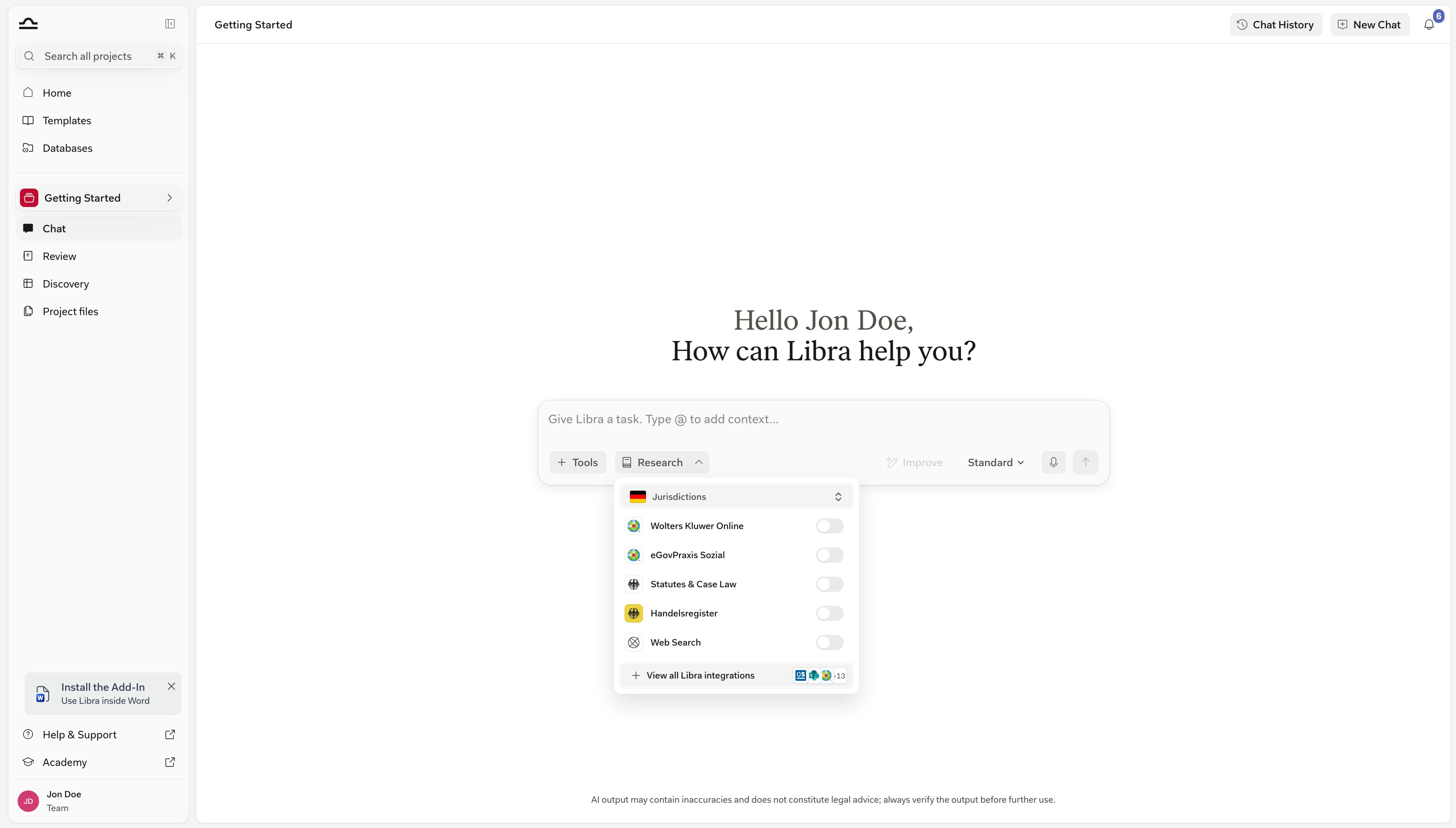
2
Set your jurisdictions
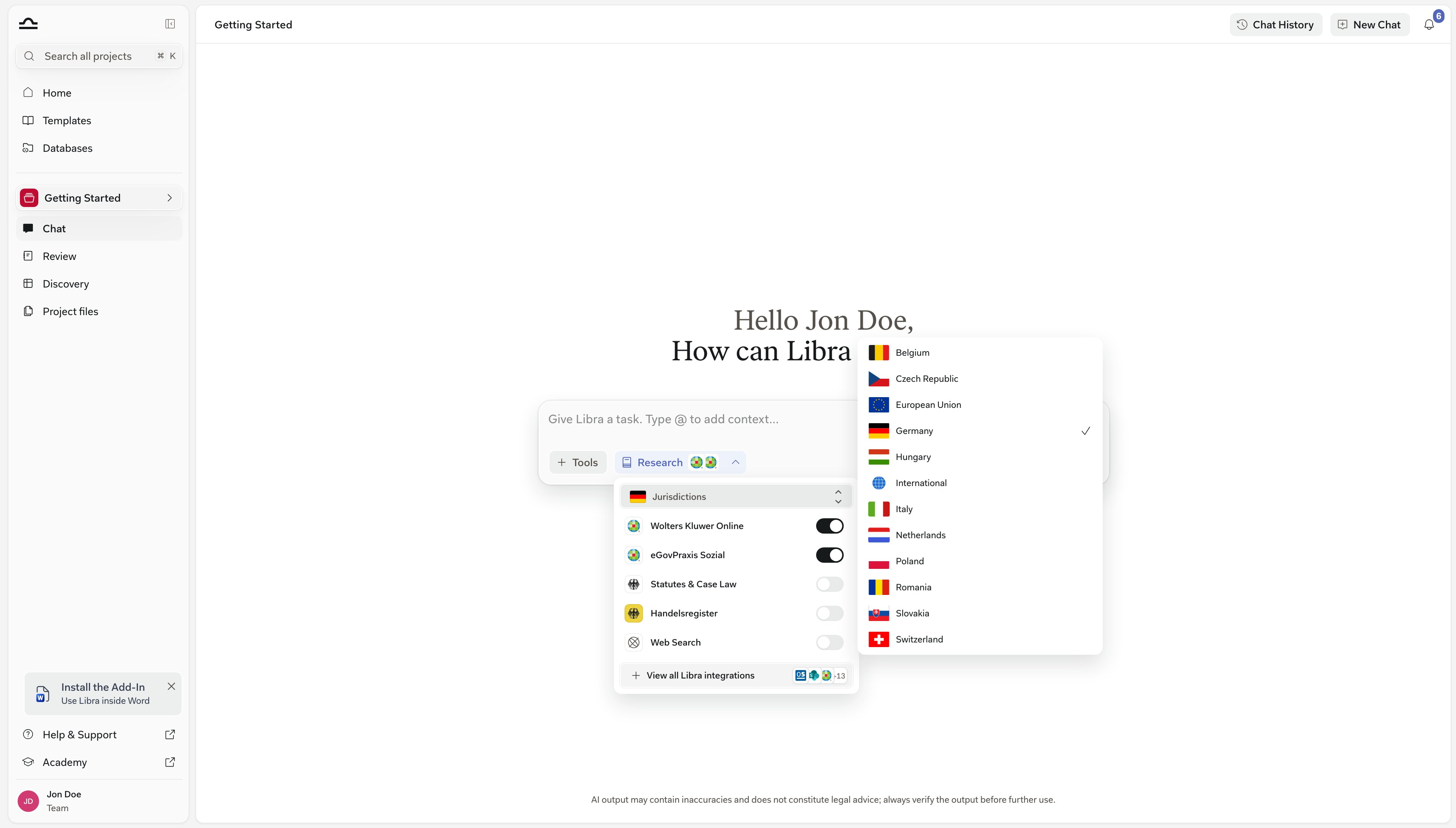
3
Toggle the sources you want
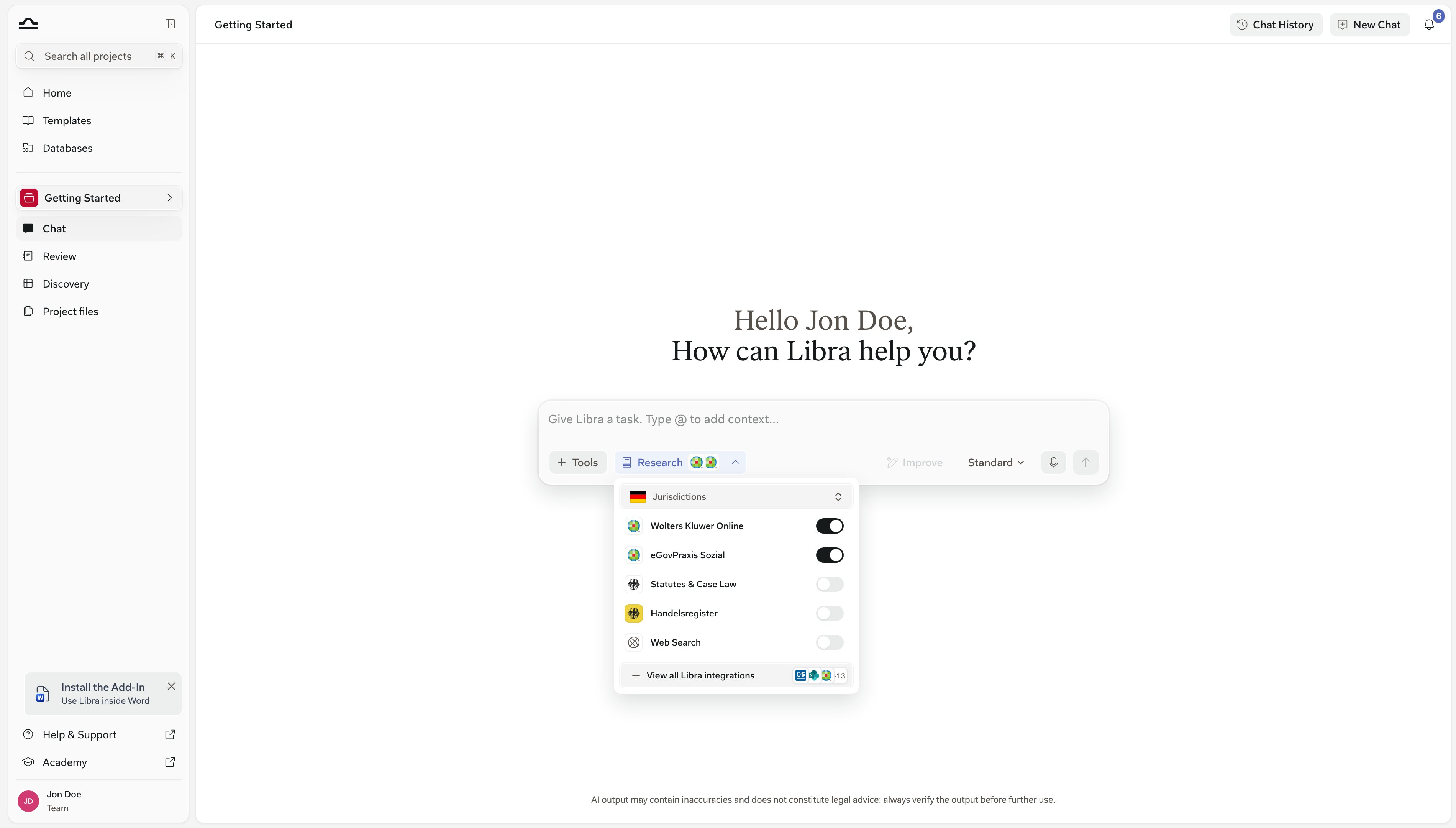
4
Send your prompt
The Research button highlights and shows the icons of your selected sources, with a
+N chip when there are more than fit. Send the prompt and the answer comes back with citations to what Libra actually retrieved.Clicking the main part of Research switches it off again and keeps the selection, so one more click switches the same sources back on — here and in every other chat.German teams don’t have to pick a source for German law.Enable Statutes & Case Law on the Chats tab in Settings is on by default, so any chat model reaches for German statutes and case law from Wolters Kluwer Online on its own — no Research toggle, no Wolters Kluwer subscription.It replaced the older Otto Schmidt default, which stays available as a source you tick yourself. Refresh the page after changing it.
Outside Germany, teams with Wolters Kluwer access start with Research on and their home jurisdiction’s Wolters Kluwer sources ticked. That happens once, on first use.From then on your own selection wins: a source you switch off stays off until you switch it back on. German teams start with Research off.
The legal databases in this panel are not Databases, the feature in the left sidebar. Those are structured collections built from your own documents, and you bring them into a chat through Tools → Select files rather than through Research. See Databases.
See Libra’s research process
Above the answer sits a collapsible strip recording every step Libra took. Click anywhere along its header row to open it; the chevron on the right shows which way it will go. The strip mixes Libra’s own reasoning with its searches. A thinking row carries the first line of what it was working through, in your language, and each database it queried gets its own heading. Several look-ups in the same database during one round sit beneath that one heading, rather than repeating it.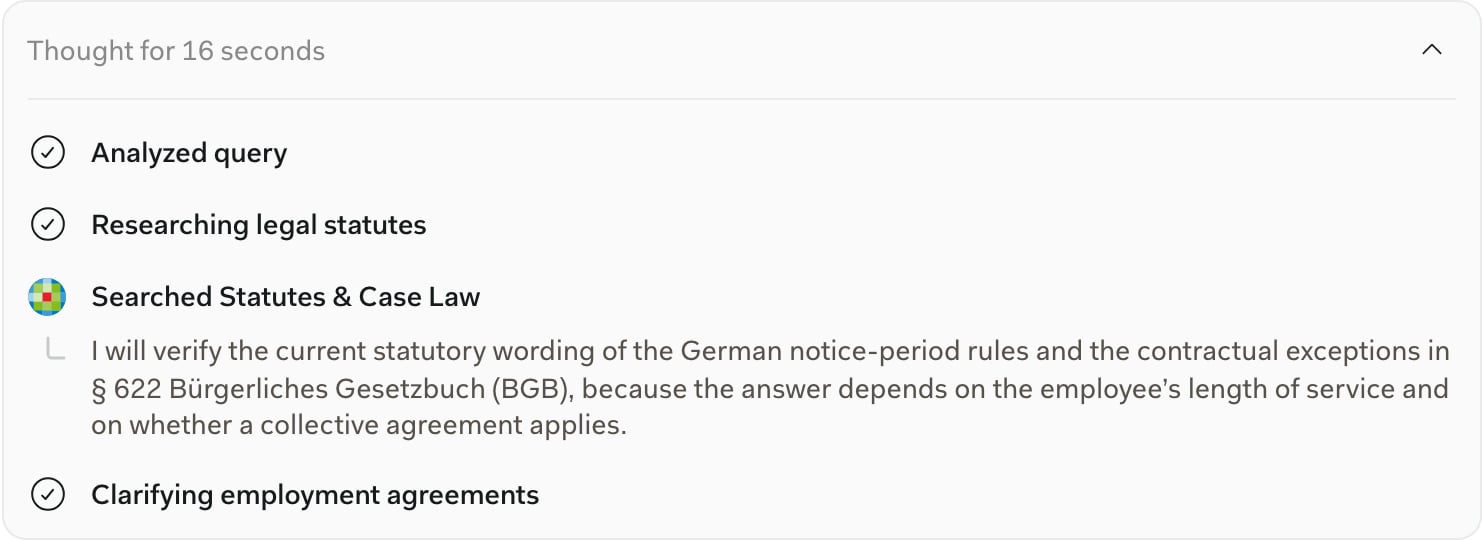
- Show another lawyer exactly how the answer was researched.
- When an answer feels wrong, the steps usually show why — the wrong source, a missed database, a query framed differently than you would have.
Which citations carry a warning
Every citation is a chip in the text carrying the source’s name; hover it for the cited passage, click through for the source. Citations & sources covers the chip and the panel in full. Citations from the open web — Web Search results and Handelsregister company lookups — carry an extra line in that card: Be aware: unverified third-party web information. Citations from your subscribed databases don’t, because Libra retrieved the passage from the database itself. Anything Libra asserts in prose without a citation chip comes from its general knowledge. Treat it as a lead to follow up, not as a citation.
A source that never appears in the steps strip was never queried. If a database you expected is missing, open the Research panel and check it is still ticked — a source you switched off stays off until you switch it back on.
When Libra warns the answer isn’t grounded
Under the most recent answer, Libra sometimes adds a small grey note that the answer may be incomplete. Which of the three you get says something different:Not generated from trusted sources, with a subscription prompt
Not generated from trusted sources, with a subscription prompt
This answer may be incomplete or outdated because it wasn’t generated from trusted sources. You have no connected databases and no documents in the chat, so Libra had nothing to research against.The note offers two links: activate your account, which opens Settings → Integrations if your firm already holds a content subscription, and get a subscription if it does not.
Please select one or more trusted sources
Please select one or more trusted sources
The same opening line, followed by a pointer to the research selector. You do have databases available, but none were switched on for this message. The link opens the Research panel so you can toggle sources and ask again.
Libra didn't find content in your activated sources
Libra didn't find content in your activated sources
Your sources were on, but this answer came back with nothing from them. Depending on your subscription the note either points you to View your subscriptions or explains that Libra only answers from subscribed content.
The Cited Sources panel
Any answer that drew on at least one source gets a Cited Sources pill below it. Click it and every source — web search, documents, legal databases, attached Reviews, Discoveries — appears in one list. See Citations & sources for the panel walkthrough.Libra’s own documentation is a source too
When a product or how-to question comes up mid-answer — “how do I export this table with footnotes?” — Libra pulls the answer from the Libra help documentation and cites it alongside your legal sources, in the same Cited Sources list. Those citations point at the documentation site, so they are exempt from the unverified-web note.Sources in the Research panel
The panel uses the databases’ own branding, so Otto Schmidt appears as Verlag Dr. Otto Schmidt rather than the name on its connector card. What you see depends on your ticked jurisdictions and your firm’s subscriptions.
The full catalogue — every country, every source, and which ones are an add-on — is in Content integrations.
Tips for effective research
State the jurisdiction in the prompt as well
State the jurisdiction in the prompt as well
Even with the jurisdiction ticked, “under German law…” in the prompt itself sharpens the answer.
Provide context about your client and matter
Provide context about your client and matter
“My client is a Swiss software company with 50 employees” gives Libra what it needs to scope an employment-law answer. Generic prompts get generic answers.
Use Deep Thinking for cross-jurisdictional questions
Use Deep Thinking for cross-jurisdictional questions
A question comparing two jurisdictions rewards Deep Thinking alongside Research. Pick the slower tier when an answer has to hold two bodies of law in view at once.
Ask follow-up questions in the same chat
Ask follow-up questions in the same chat
Research context carries forward: citation numbers continue and Libra remembers which sources it consulted. Use it to drill into one finding without restarting.
Next steps
Citations & sources
The unified Cited Sources panel: read it, verify it, export it.
Chat basics
The composer, the modes, and finding an old conversation.
Content integrations
Browse the legal databases Libra integrates with.