

What’s in a Playbook
A Playbook is built in three nested layers — Topics at the top, Positions inside each Topic, Rules inside each Position.
A quick example. For the Topic Working hours in an employment contract, your Starting position might consist of two Rules:
- Weekly working time does not exceed 40 hours.
- The agreed gross monthly salary compensates for no more than 10 overtime hours per month.
Where a Review starts
There are two paths, and they end in the same result. From the Review page. Open Review in your project. Your Playbooks sit across the top under three tabs — My Playbooks, Shared and Libra — for the ones you built, the ones your team shared with you, and the ones Libra ships. New Playbook starts an empty one; Browse templates opens the full library. Pick a Playbook and choose Run, then pick the files in the Select Documents to review dialog and click Start Review. You can select more than one file — the Review returns a single set of Topic verdicts across everything you attached. From Chat. Drop the contract into a chat and ask Libra to “review this against our standard NDA terms”, or arm the mode yourself from Tools → Start analysis → Review. Libra offers you the matching Playbooks to choose from, runs the Review, and shows the result inline. See Reviews from chat. Either way the finished Review is saved into the project’s Reviews folder in Project files, and the run joins the list below the Playbooks on the Review page with its status, document count and Topic count.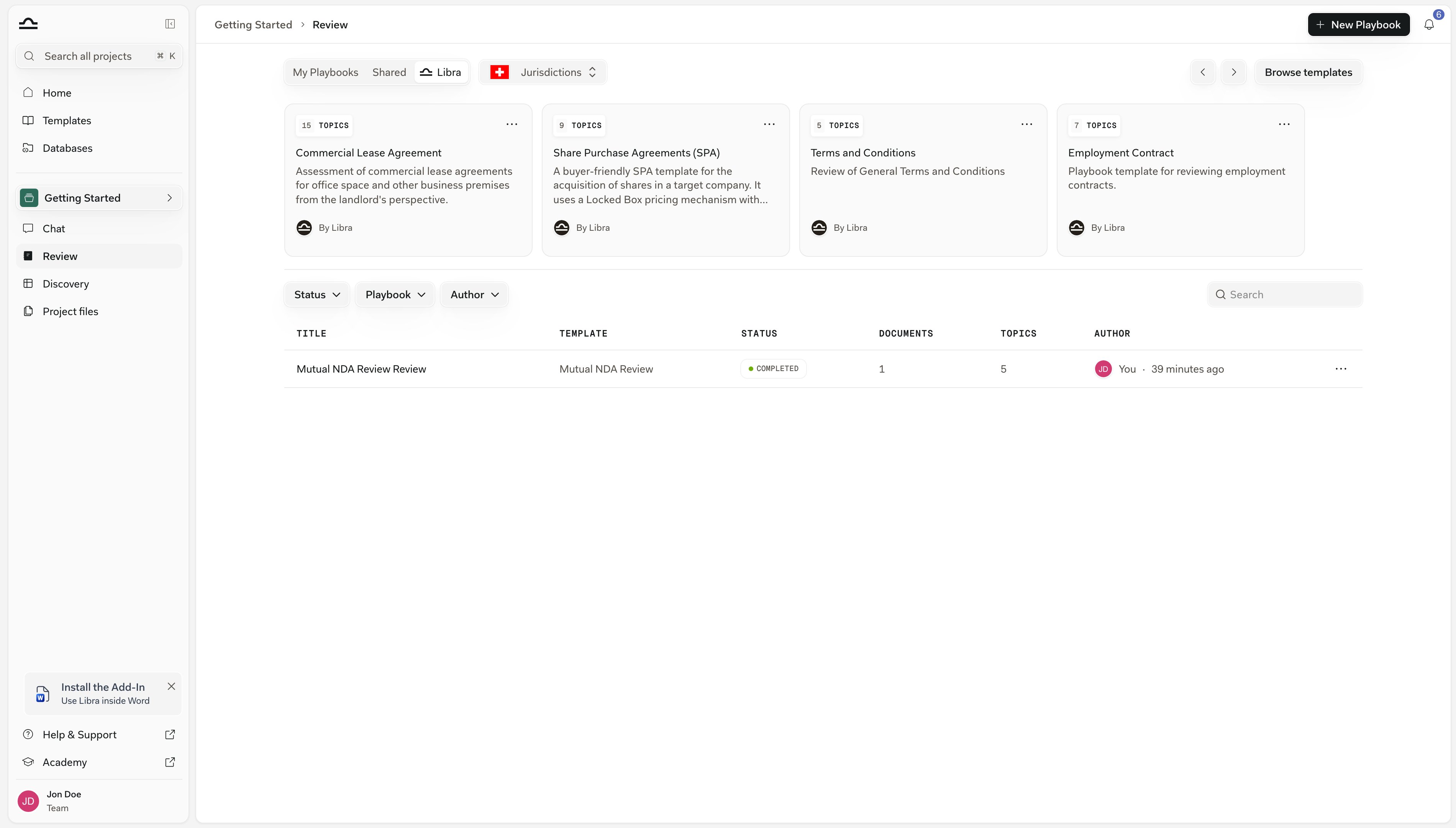
What you get back
A Review result is structured, not narrative. Topics are numbered01, 02, 03 and laid out one after another, each with a risk badge and a Reasoning paragraph. The Positions underneath start collapsed; open one to see its Rules.
Once the Review has finished, Export in the result header writes the whole thing out as a Word document.
See Understanding Review results for how to interpret each part.
When to use Review
Review earns its keep whenever the answer has to hold up clause by clause. Four situations where it beats asking in chat:A new draft of a contract you've negotiated before
The fastest way to spot where a redline has drifted from your standard positions.
A document you receive from the other side
Run a Review to see at a glance which Topics need a redline, and where the deviations actually sit.
A first pass on a high-volume queue
Every contract is measured against the same Topics and Rules, so you can triage a stack the same way and see which ones need a partner’s attention.
A research-grounded check
Auto mode swaps a Topic’s rules for a question — “is this clause enforceable under prevailing case law?” — and answers it from your research sources.
Review vs. Discovery
Both extract structured information from documents, but they answer different questions.
When in doubt: if the question is “is this one contract OK?”, run a Review. If the question is “how do these many contracts compare?”, run a Discovery.
Tips for getting good Reviews
Start with one or two Topics, not twenty
Start with one or two Topics, not twenty
A Playbook with a couple of well-defined Topics gives you cleaner output than a sprawling one that tries to cover everything. Add Topics once you trust the basics.
Write Rules the way you'd brief a junior associate
Write Rules the way you'd brief a junior associate
“Weekly working time does not exceed 40 hours” is a rule. “Working time should be reasonable” is not. Specific, testable, unambiguous.
Add ideal language to power Word add-in suggestions
Add ideal language to power Word add-in suggestions
On a Starting or Fallback position, Add ideal language attaches the wording you would actually accept, and the Word add-in uses it when it redrafts a flagged clause.Not acceptable positions don’t take one — there is no ideal version of a clause you never want to see.
Check the citations behind every red badge
Check the citations behind every red badge
Red is the signal, whatever word it carries: Not met on a Starting or Fallback position, Detected on a Not acceptable one. Click through to the cited passage and confirm Libra read the contract the way you would before you act on it.
Next steps

Build a Playbook
Topics → Positions → Rules → ideal language.
Auto mode
Skip the rule-building and ask a research-backed question instead.
Understanding results
What the risk badges, Met counts, and citations actually mean.

Reviews from chat
Run one without leaving the conversation, and keep the result as context.