


Moving to another step replaces whatever is in the input with that step’s prompt. Send — or copy out — what you are part-way through typing before you press ‹ or ›.
Starting a Workflow
There are two ways in. From the Templates library. Click Templates in the global part of the sidebar, open the Workflows tab, and click Run on the Workflow’s card. A new chat opens with the Workflow loaded at step 1 and that step’s prompt already in the input, ready for you to edit and send. From a chat. In the composer, choose Tools → Workflows. The picker lists what you can run under All, Yours, Shared and Libra, with the usual jurisdiction, practice-area and tag filters. Picking one loads it into the chat you are already in and switches the chat to the Assistant on step 1. In a chat that already has messages, the Workflow attaches without touching the input — nothing you have typed is overwritten until you move between steps.Working through the steps
Once a Workflow is active, a compact row appears inside the composer, just above where you type — not at the top of the chat. Reading left to right it shows the Workflow icon, the step Assistants stacked as overlapping avatars, the Workflow’s name, a chevron, and then the Assistant handling the step you are on. Directly after that comes the step counter — rendered as 2 / 4 — between ‹ and › buttons. At the far right of the row sits an ✕ that removes the Workflow. Nothing advances on its own. When a step’s answer comes back, Libra stays where it is; you decide the step is finished and move on.- ‹ and › step back and forward one at a time, and stop at the first and last step.
- Hover the current Assistant’s name and a Steps list opens showing every step in order. Click any entry to jump straight there — useful for skipping ahead or going back several steps at once.
- Hover the Workflow’s name instead and you get the whole numbered step list as a tooltip, without leaving the step you’re on.
- However you move, Libra switches the chat to that step’s Assistant and puts that step’s prompt into the input. Edit it before you send, or send it as written.
- Up to three of the current Assistant’s suggested prompts appear as buttons in a row underneath. Clicking one writes it into the input; you still choose when to send.
- ✕ takes the Workflow off the chat and returns it to an ordinary chat. The messages you have already exchanged stay where they are.
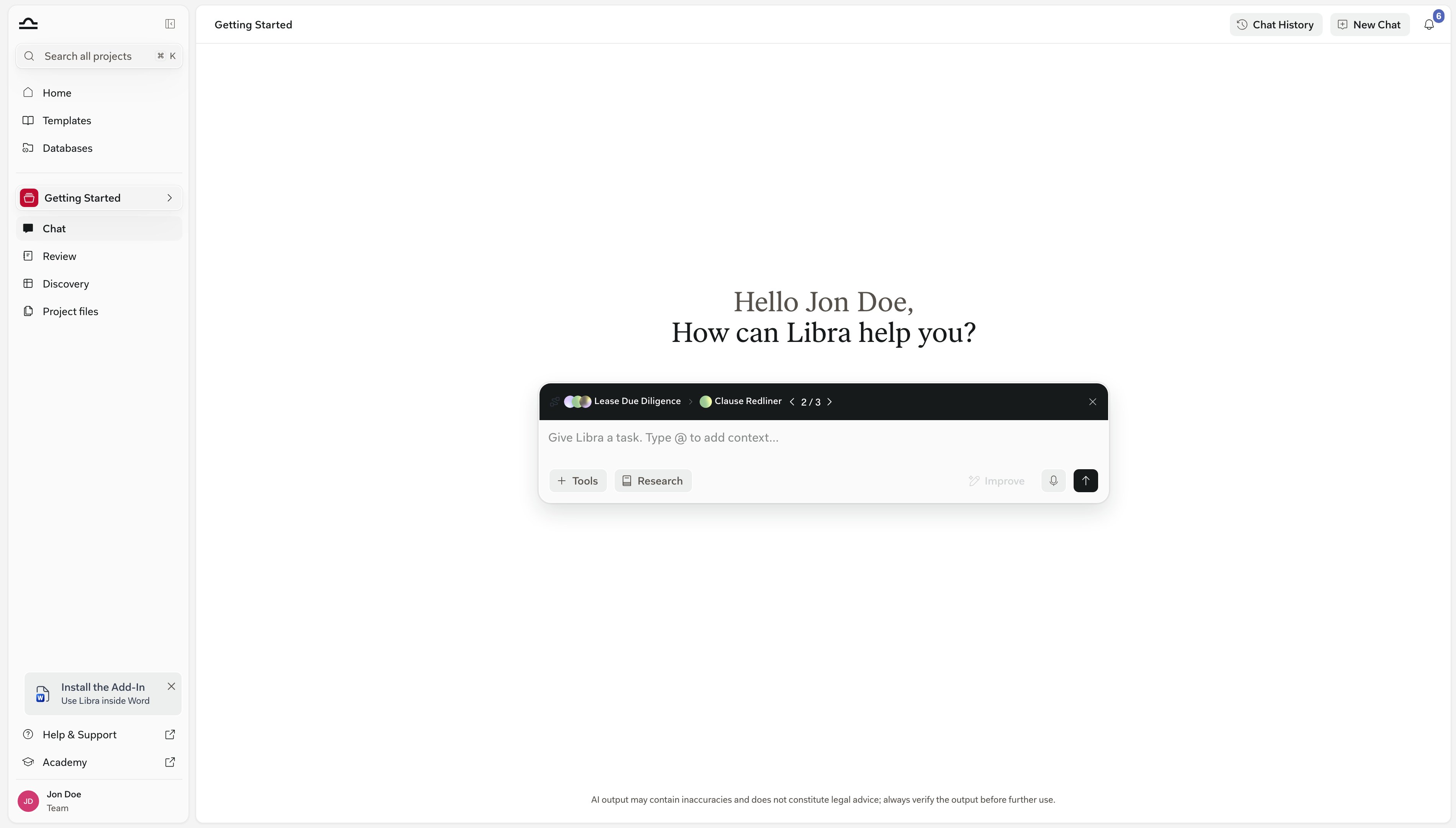
What a Workflow is made of
Suggested prompts come from the Assistant on the step, not from the Workflow — tune them on the Assistant and every Workflow that uses it picks them up.
When to use Workflows
A Workflow needs at least two Assistants before it can be saved or run. For a task that only needs one, use that Assistant on its own — Workflows pay off when there are at least two distinct stages.
Where Workflows live
Workflows are templates. They live in the global Templates library under the Workflows tab, alongside the Assistants, Reviews and Discoveries tabs, and any project can run them.Common Workflow examples
Contract Review
Contract Review
Document analysis → Risk evaluation → Summary of critical pointsChain a contract-analysis Assistant with a risk-evaluation Assistant, finishing with a summary generator. The output is a partner-ready brief.
Due Diligence
Due Diligence
Document categorisation → Per-category assessment → Final reportProcess large document sets systematically with specialised Assistants for each phase.
Brief Drafting
Brief Drafting
Fact analysis → Legal research → Draft → Format checkTake a case file through analysis, legal research, drafting, and final formatting in one run.
Client Intake
Client Intake
Intake form parsing → Conflict check → Engagement letter draft → Email summary to partnerStandardise the front end of every new matter so nothing slips through the cracks.
Tips
Build small Workflows first
Build small Workflows first
A 3-step Workflow that works reliably beats a 10-step Workflow that breaks halfway through. Start short; add steps once each one is solid.
Each step should have one job
Each step should have one job
If a step is doing two things, split it. “Analyse the contract and draft a summary” is two steps. Splitting them makes failures easier to diagnose.
Use the same Assistant in multiple Workflows
Use the same Assistant in multiple Workflows
A well-tuned Assistant can be a step in many Workflows. Build the Assistants right; reuse them aggressively.
Document the Workflow in its description
Document the Workflow in its description
The description shows up to colleagues who haven’t seen the Workflow before. A one-paragraph “what this is for and what it expects as input” prevents misuse.
Next steps
Create a Workflow
Build a Workflow step by step.
Workflow templates
Reuse and share Workflows from the Templates library.

Assistants
The building blocks of Workflows.