

Edits you make to a Topic can travel back to the Playbook the Review came from — Libra asks you every time. Pick Only this review unless you really want the next matter to inherit the change.
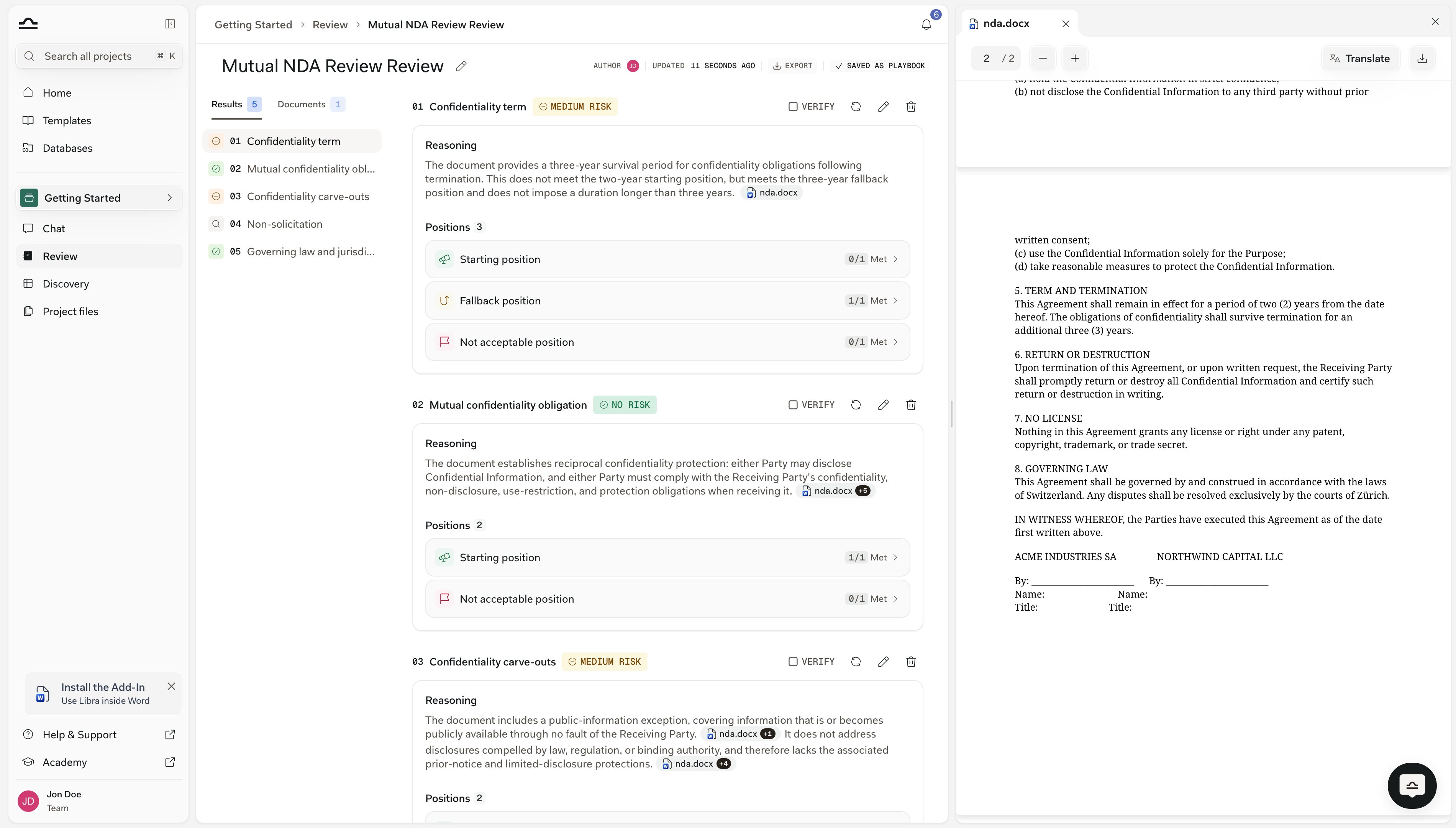
How the result screen is laid out
The Review opens on three panes. On the left, a sidebar with two tabs: Results, listing every Topic with its number and a coloured risk icon, and Documents, listing the files the Review ran against. Clicking a Topic in the list scrolls to it. In the middle, the Topics themselves, numbered01, 02, 03 and laid out one after another. Each one carries its risk badge, a Reasoning paragraph, and a Positions section.
On the right, the document viewer. It opens when you click a citation, and shows the cited page with the passage highlighted.
Above all three sits the header strip: the Review title, Author, Updated, an Export button, and either Save as Playbook or a Saved as Playbook marker.
The levels of a result
Topic risk badges
Every Topic that finished gets one badge.
Two details of the rollup are worth knowing, because they change how you read a badge:
No risk is a strict gate. It needs all three: the Starting position fully met, no rule met on any Not acceptable position, and every rule actually judged.
So a contract that satisfies every rule you wanted but also contains a clause you forbade is not No risk. Neither is a Topic where three of its five rules abstained — that one comes back amber, not green.
Fallback positions are deliberately left out of the gate. Meeting a Fallback rather than the Starting position is a Medium-risk outcome, not a clean one.
High risk is a comparison, not a threshold. Libra scores each position by the proportion of its judged rules the contract meets, then asks whether a Not acceptable position scores at least as high as every other position on the Topic.
So a Topic with no judgeable Not acceptable rules never comes out High risk. It is No risk if it clears the gate above, and Medium risk otherwise — however thin the coverage is.
A Not verifiable Topic is left out of the Review’s compliance figure entirely: scoring “couldn’t check” as non-compliant would mark down a contract that properly delegates a subject. An amber Topic with unjudged rules does count against it.
Position Met counts
Each position row in a Topic shows how its rules came out, in the form2/3 Met · 1 Not verifiable.
Met is literal, and it does not flip by position type. It always counts the rules whose described condition holds, so a high Met count is good news on a Starting or Fallback position and bad news on a Not acceptable one.
A Not acceptable position reading
2/2 Met means both forbidden clauses were found in the contract. A clean contract reads 0/2 Met there.
That is deliberate: the neutral tally lives in the count, and the good/bad signal lives in the colours — the Topic risk badge above it and the per-rule badges inside it, which do change wording by position type.
A position whose rules all abstained shows only the Not verifiable count. There is no Met figure to give.
Rule outcomes
Open a position and you see its rules, labelled Rule 1, Rule 2 and so on, each with an outcome badge and a Reasoning paragraph. The badge wording depends on the position the rule sits in, because “the condition holds” means the opposite thing on a Not acceptable position:
Two more badges appear on any position type: Not verifiable in grey, meaning the material under review doesn’t give Libra enough to judge the rule either way, and Pending while the rule has not been evaluated yet.
Not verifiable used to read Not applicable. The name changed to say what it actually means, and older Reviews now show the new label too, so a result from last quarter reads the same way as one you ran today.
Read the colour, not the word, if you’re skimming: red is always the outcome you need to look at, whichever label it carries.
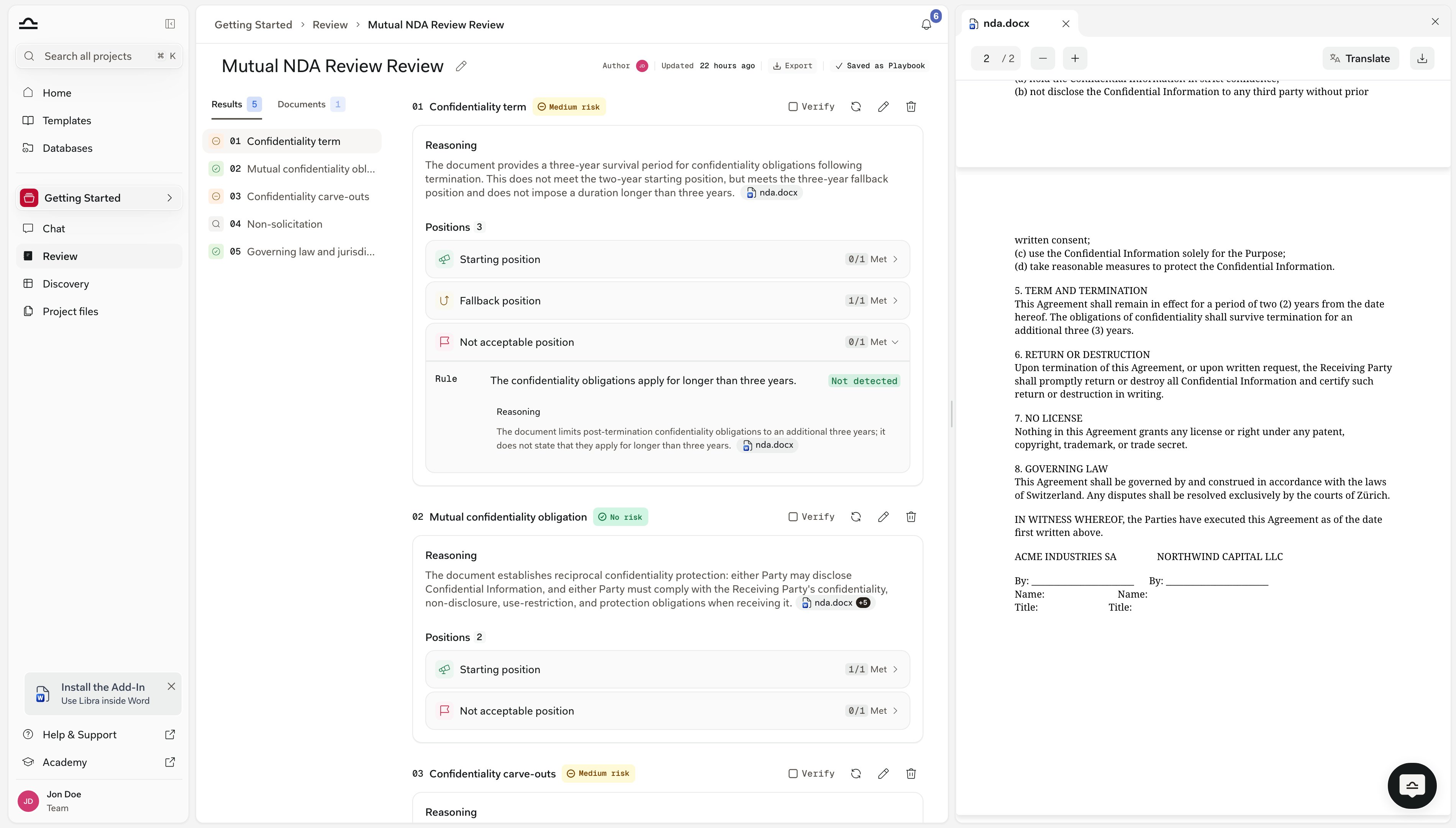
Rule 1: Weekly working time is between 40 and 50 hours. Not met — The working time is not clearly defined in the employment contract. Without a definition, it may exceed 50 hours per week.
Citations
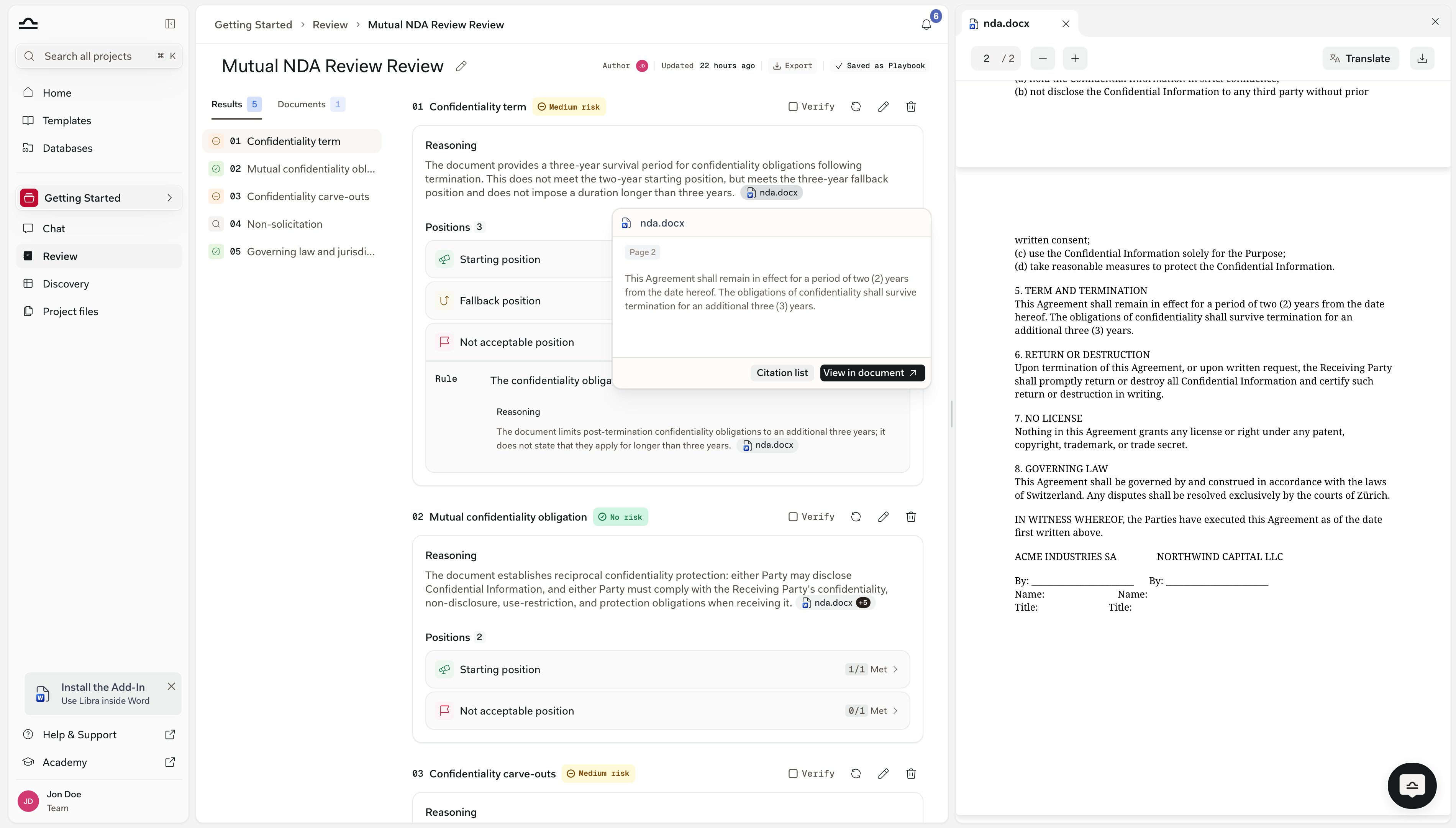
Citations are how Reviews stay verifiable, and they live inline in the reasoning text rather than in a list underneath it. Each one renders as a small pill in the sentence it supports, carrying a file icon and the source document’s name, truncated to fit. Where Libra can’t resolve the file name, the pill falls back to a plain Document label. Anything Libra pulled from a legal database carries that research source’s own icon and name instead. Several citations backing the same sentence collapse into one pill with a+1, +2 counter.
Hover a pill and you get a card with the cited text. Its footer offers View in document and, where the block has sources to list, Citation list, which opens every source cited in that reasoning block in a side panel.
Click the pill itself and the document viewer opens alongside the result at the right page, with the passage highlighted.
Auto mode Topics
A Topic run in Auto mode looks different, because it has no positions and rules to roll up. It carries an Auto mode badge in its header, stacked with icons for the research sources it used, and the usual risk badge. Below that sits a Reasoning block and nothing else — no Positions section. The citations in that reasoning mix document pills with research-source badges, so you can trace both what the contract says and what Libra looked up. A Review can mix Auto mode and rules-based Topics; both render in the same result with the same risk badges. See Auto mode.Marking a Topic as reviewed
A Review is a working document, not a one-shot output. Each finished Topic has a Verify button in its header — tooltip “Mark as reviewed”. Click it and the button becomes a Reviewed tag carrying your avatar. Hover the tag to see who verified the Topic and when. Only the person who set it can clear it again, so a colleague picking up the Review can trust the tag. Verifying needs edit rights on the Review; view-only users see the tags but cannot set them. There is one marking state, not two — a Topic is either verified or it isn’t. If a Topic needs follow-up, leave it unverified and use your own matter notes.Changing a result
Rule outcomes themselves are not editable — you can’t flip a Not met to Met in place. What you change is the Topic, and Libra re-evaluates it. Each Topic header carries three controls, all of which need edit rights:1
Re-run evaluation
The circular-arrow button re-runs the Topic against the same documents, unchanged. Use it when a Topic failed, or when you think a retry will do better.
2
Edit topic
The pencil opens the Topic’s positions and rules in an editor. Rewrite a rule that was too vague, add a missing one, drop one that doesn’t belong. Save confirms with “Topic saved, re-evaluating…” and Libra re-runs that Topic on the new definition.
3
Delete topic
The bin removes the Topic from the Review.
Whether the change reaches the Playbook
If the Review is attached to a Playbook you have edit rights on, saving an edit, an addition or a deletion opens a confirmation first. The title follows the action — Update the original playbook too?, Add to the original playbook too? or Remove from the original playbook too? — and each offers the same pair of choices, plus Cancel to back out.
You won’t see the prompt when the Review has no Playbook behind it, when you don’t have edit rights on that Playbook, or when the Playbook has moved on to a newer version since the Review was created.
In all three cases the change stays on the Review. The prompt is also skipped when you delete the last remaining Topic — Libra will not push a Playbook with no Topics back to the library.
If you find yourself making the same edit on Review after Review, that’s the signal to fix the Playbook — either through Update playbook & review here, or on the Playbook itself.
Exporting a Review
The header has a single Export button. It downloads the finished Review as a Word document (.docx) — there is no format picker. The button is disabled until the run completes, with the tooltip “Available once the review finishes processing”.
Next to it sits the Review’s Playbook link. A Review that came from a Playbook — or one you have since saved as a Playbook — shows a Saved as Playbook marker; hover it and Libra names the Playbook.
A Review with no Playbook behind it shows a Save as Playbook button instead. It asks for a name and a description, then turns the Review’s Topics into a reusable Playbook for the next matter.
Tips for reading Reviews efficiently
Triage by risk
Triage by risk
Open the High-risk Topics first. Skim the Medium-risk ones. Trust the No-risk ones, but spot-check one or two for sanity — No risk is a strict gate, so it earns some trust.
Check the Met count against the position type
Check the Met count against the position type
On a Not acceptable position, a high Met count is the bad outcome. If a position reads
2/2 Met under a red Topic badge, that is two forbidden clauses found, not two boxes ticked.Read the rule that surprises you
Read the rule that surprises you
If an outcome surprises you, that is exactly the rule whose reasoning to read in full. It will either confirm Libra is right, or reveal a misread you can fix by sharpening the rule and re-running the Topic.
Treat citations as your audit trail
Treat citations as your audit trail
A Review is only as defensible as its citations. For client-facing or partner-facing work, click through every citation on the Topics you intend to negotiate.
Next steps

Reviews from chat
Use a finished Review as context in a follow-up conversation.

Playbooks
Tune the Playbook if a result wasn’t what you wanted.