

Practice areas and tags aren’t only for templates. They’re first-class labels on projects and chats too — filter by them from global search alongside its Created by filter (You, Team, Libra), and scan the Practice area and Tags columns in your project list and in the Templates list view.

Two tags widen the results rather than narrowing them: NDA + English returns templates carrying either. Different filters do narrow each other, so Employment + NDA means “in Employment and tagged NDA”.
Why two systems
Practice areas are the firm-wide cabinet. The list is fixed — the same nineteen areas for every firm on Libra, so there’s no drift between teams — and a template can carry as many of them as genuinely apply. Tags are the labels you stick on individual templates. They’re free-form, you invent them, and a template can carry as many as you find useful. The two work in different directions: the practice area answers what kind of work is this?, the tag answers what’s specific about this one? — NDA, English, German law, or an internal client code. The practice-area list isn’t configurable. There’s no setting for adding your own area, which is exactly the gap custom tags fill. The nineteen areas, alphabetically as the Practice area filter lists them, are:- Administrative
- Arbitration
- Commercial
- Corporate
- Criminal
- Employment
- Family & Inheritance
- Finance
- General
- Intellectual Property
- IT & Data
- Litigation
- M&A
- Other
- Real Estate & Tenancy
- Regulatory & Compliance
- Restructuring & Insolvency
- Tax
- Tort, Liability & Insurance
Setting a practice area and tags
Both fields live in the configuration panel of a template’s editor — the column down the left of the page, headed for whatever you’re editing (Playbook Configuration, Assistant Configuration, Discovery Configuration, Workflow Configuration). On a narrow screen it collapses behind the Configuration gear in the header. Both fields are marked optional. The Select practice area field is a dropdown that rests on Select — it reads simply Practice area when you’re viewing a template you can’t edit. Options toggle, and every area you pick becomes a chip in the field, each with a cross that removes just that area. There’s no clear-all in the editor; that’s the Clear selection row in the Practice area filter on the Templates page. Tags is a dropdown too, not a free-text field. It rests on Select or create your own tags and opens onto a search box — Search existing tags or add a new one… — above the tags already in use. Typing filters that list; when nothing matches, a Create tag for row appears with your text and makes the tag on the spot. Tags are capped at 40 characters. Picking an existing suggestion instead of inventing a near-duplicate is the single habit that keeps the vocabulary tidy. Once the template is saved, its tags show up in the Tags column of the Templates list view and in the Tags filter for everyone who can see that template.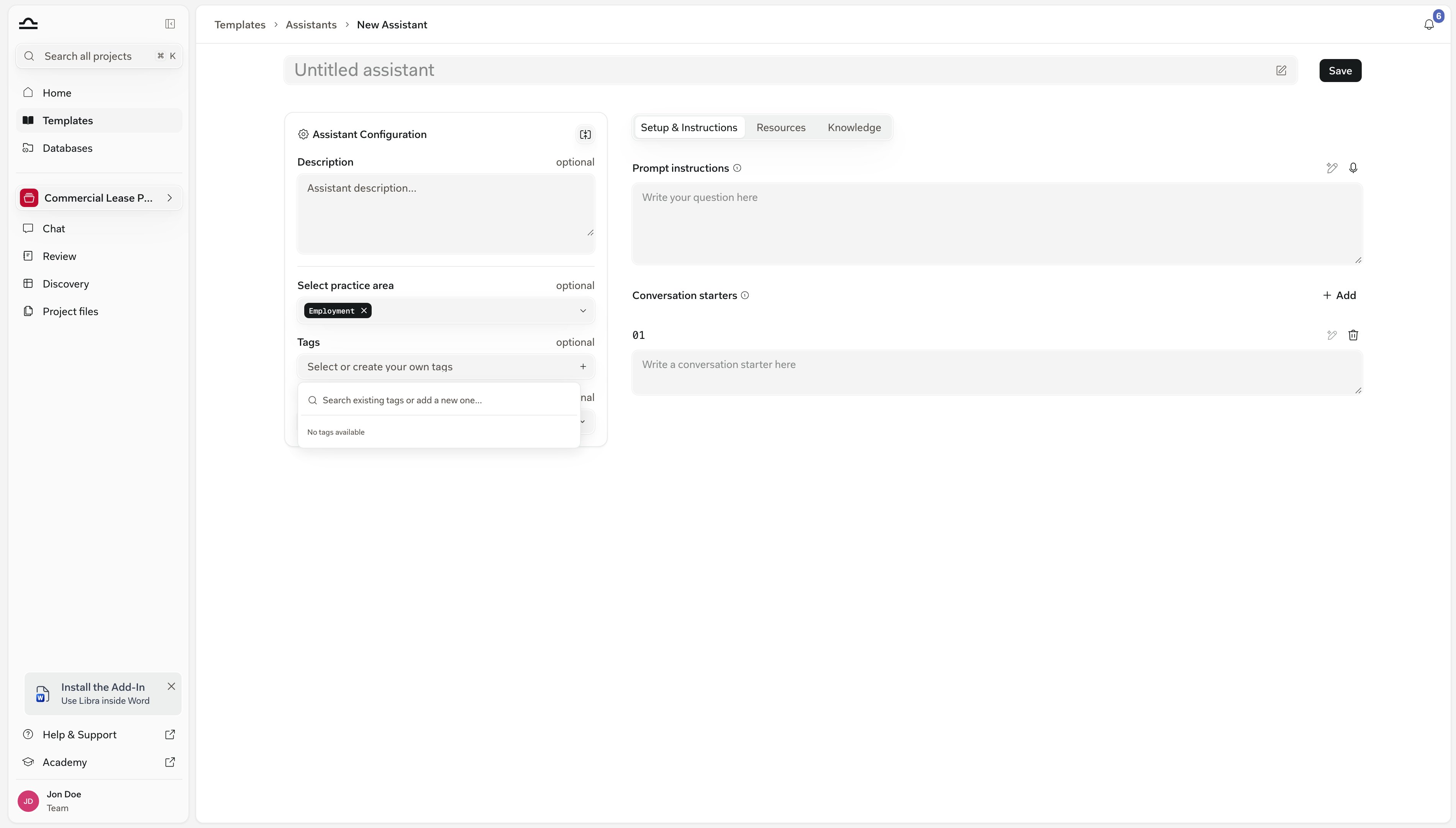
Filtering the library
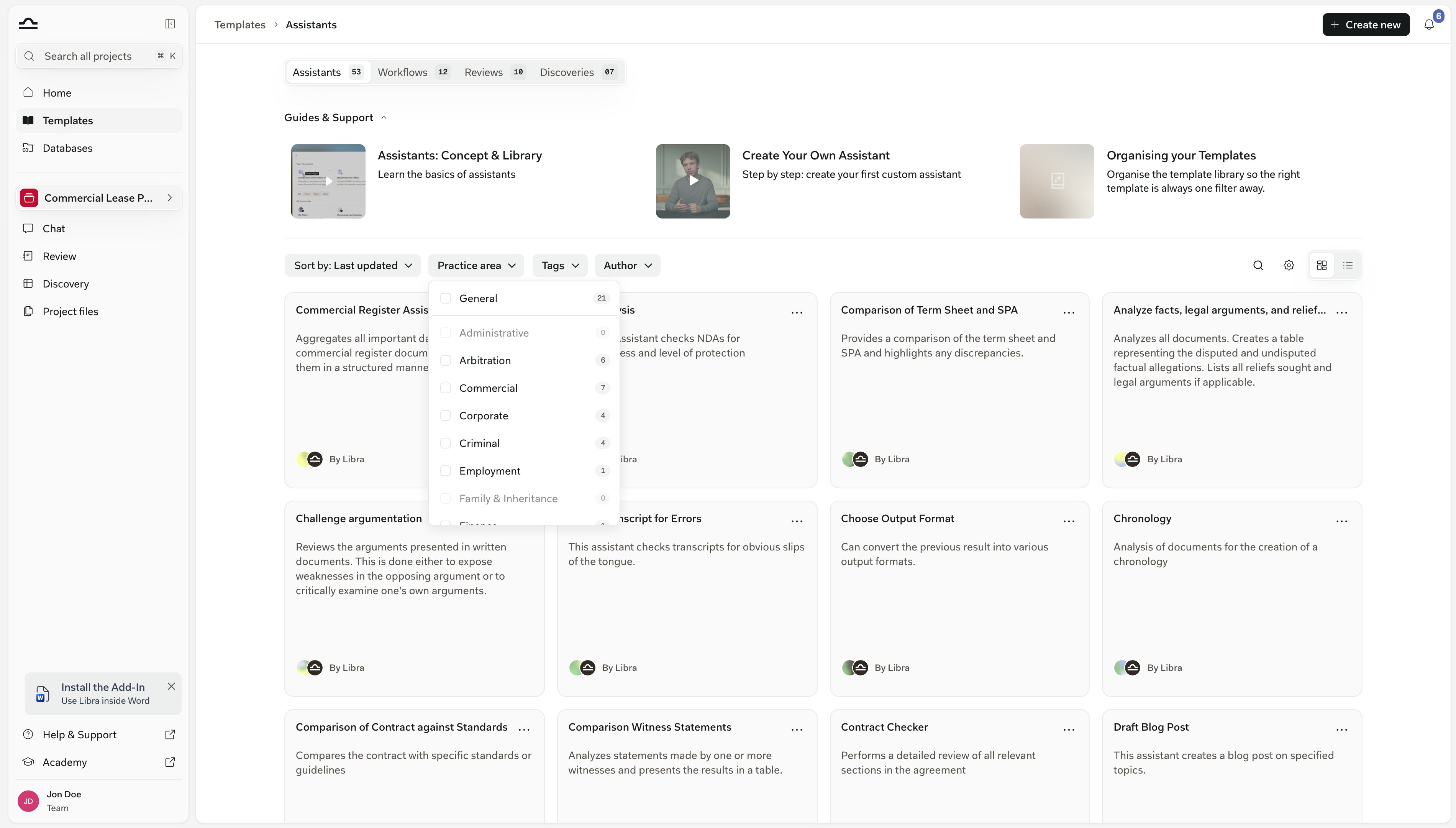
The Templates page carries a horizontal filter bar above the results. From the left: Sort by, Practice area, Tags and Author. On the right sit the search box, an Advanced filters gear, and the grid/list view toggle. Clear all filters appears at the end of the bar as soon as one filter is active and drops all of them at once — which is why you won’t see it on an unfiltered library. Two rules govern how the filters combine. Within one filter, selections are alternatives: two practice areas return templates in either. Across filters they narrow each other: a practice area plus a tag returns only templates that satisfy both. Filters apply to the tab you’re on, and the counts beside each practice area and tag describe that tab only. The library remembers how you left it. Your filters, sort order and grid or list view carry across the four tabs, survive a reload and stay in step across browser tabs. A search stays put while that browser tab is open. All of it clears when you sign out. When nothing matches, the library says so — No matching assistants, or the equivalent for the tab — with Clear filters to start again.1
Practice area — the primary cut
Pick one or more areas to scope the library to the law you’re working in. Each option carries a count of matching templates on the current tab, and an area with none is greyed out. With several areas picked, the chip shows how many. Because the list is firm-wide and stable, this is the most reliable first filter — useful even when you can’t remember a template’s exact name.
2
Tags — a second dimension
Add tags for what the practice area doesn’t capture: document type, jurisdiction, language, client code. Remember that several tags broaden the result set rather than tightening it, so filter on the rarest tag first.
3
Author — where it came from
Author is a single control with three options: Yours, Team, and Libra (the curated library that ships with the product). Select any combination. Team doesn’t appear on solo accounts, and Libra is absent on deployments where the curated library is switched off. There’s no per-person filter here — to find a particular colleague’s templates, switch to list view and sort by Author.
4
Advanced filters — jurisdiction and language
The gear icon opens Jurisdictions and Language submenus. A template with no jurisdiction set stays visible whichever jurisdictions you select, on the assumption that it applies everywhere. The Language submenu isn’t offered on the Workflows tab.
Cleaning up tags
There is no rename and no merge. Tags are created and deleted, nothing else, and any user can do both — no admin role, no tag screen in settings. To delete one, open the Tags filter on the Templates page — or the Tags dropdown in a template’s configuration panel — and click the cross at the end of that tag’s row in the list. Don’t confuse it with the cross on a selected tag’s chip: that one only takes the tag off the template you’re editing. If nothing uses it, the tag disappears immediately. If it’s in use, a Delete tag dialog reports how many items are affected — This tag is currently used in N items — and confirming strips the tag from every template and project you have permission to edit. Read that count carefully. It covers everything carrying the tag, including items you can only view — those keep the tag, so a shared or Libra-curated template can still show a label you thought you’d deleted. Chats are outside this altogether: a tag you’ve put on a chat isn’t counted here and isn’t removed, so tidy those from the chat itself. The templates themselves are untouched either way; only the label goes. Consolidating duplicates therefore runs in one direction: add the canonical tag to each template carrying the duplicate, then delete the duplicate. Filtering the library by the duplicate first gives you the working list.A tag you create in a dropdown but never save onto anything lingers in your own suggestion list. It’s stored in your browser, so colleagues never see it, and deleting the tag clears it.
Tips for a tag system that scales
Agree a tag vocabulary as a team
Agree a tag vocabulary as a team
The first month with custom tags is when the patterns set. Spend half an hour deciding which dimensions everyone will tag — jurisdiction, contract type, client — and write the list somewhere shared.
Pluralise consistently
Pluralise consistently
Decide once whether your tags are NDA or NDAs, Lease or Leases, and stick to it. Three tags for one concept — NDA, NDAs, Non-Disclosure-Agreement — cost more to unpick than they ever saved.
Don't tag your way to a tree
Don't tag your way to a tree
If you find yourself wanting parent and child tags, the system isn’t built for it. Use the practice area for the parent dimension and tags for the child.
Next steps
Starring & sharing
Promote templates to favourite status and share them with your team.
About templates
Back to the library overview.