


The mode applies to the message you send next and stays selected as you keep working in that chat, so change it as the work changes: Standard for the first prompt, Deep Thinking for the synthesis, Fast for the summary.
The three modes
Switching modes
The mode button sits at the right-hand end of the row of controls under the chat input, after Tools, Research and Improve. It shows the mode you are currently in.1
Click the current mode
The menu opens below the button, listing the three modes with their one-line descriptions. A checkmark marks the active one.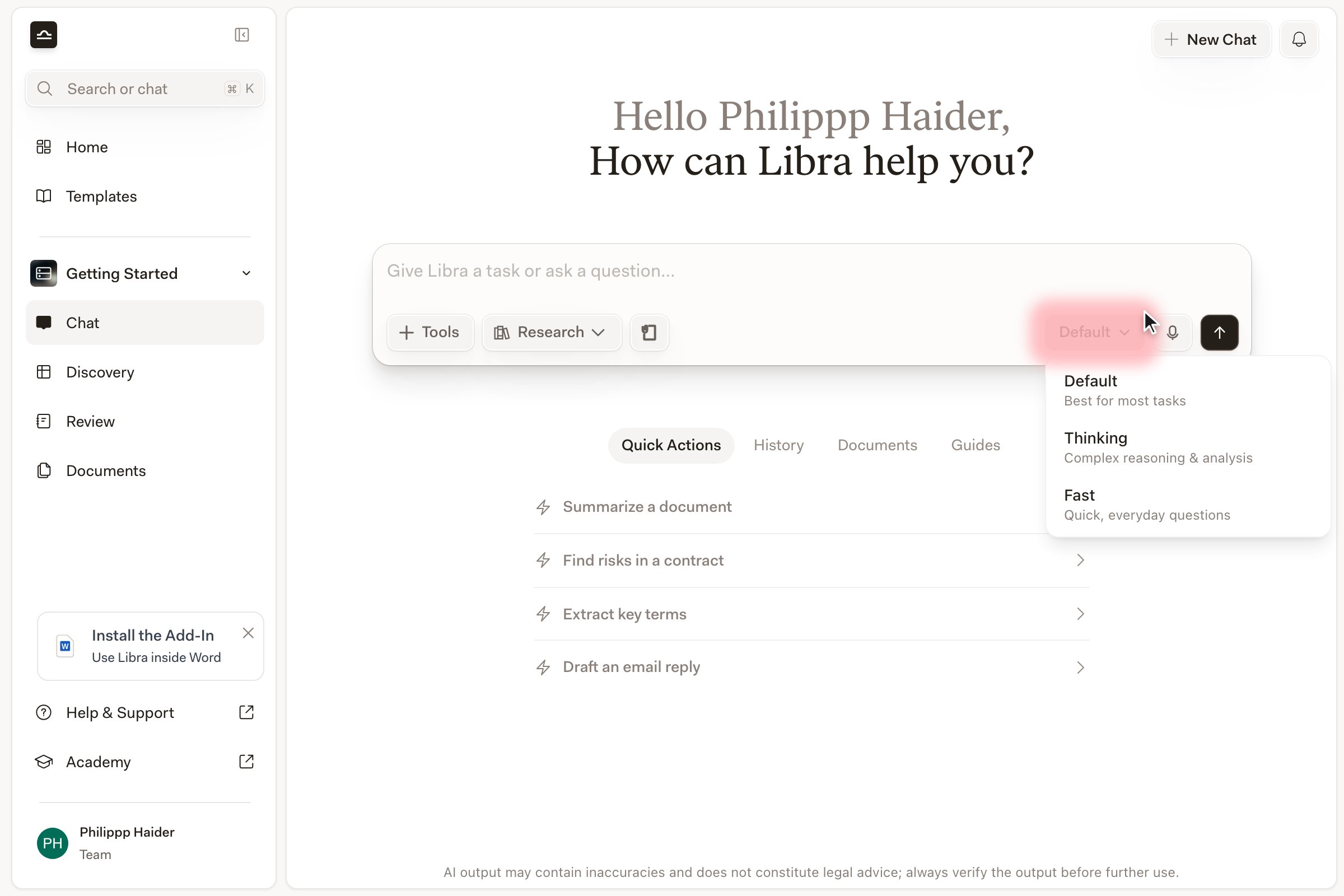
2
Pick the mode you want
The button label updates. The mode applies to the message you send next and stays selected as you keep working in that chat. It is not stored with the chat, though: reload the page and the chat comes back in Standard.
3
Read the heading above the answer
Answers produced in Deep Thinking or Fast are headed with the mode name in front of the assistant’s name. A Standard answer is headed with the assistant’s name alone — no mode in front of it. (If the heading names a model instead of the assistant, that answer ran on the named model you picked, outside the three modes.)
The mode button is hidden while an Assistant or a Workflow is driving the chat. Those run on the model they were built with, so there is no mode to choose.
Choosing a specific model
By default the menu offers the three modes and nothing else. To choose a named model, first turn on Show Model Selector on the Chats tab of Settings and reload the page — without that, the model list described below does not appear at all. Once it is on, a model row sits under the three modes. Click it (Show all) to expand the full list of models your firm has available, then pick one. Two things change when you do: the button now shows the model’s name instead of a mode, and the chat is no longer in any of the three modes — you have replaced the mode with an explicit model. Pick a mode again to go back. The same row lets you pin a model as your default, and add a second and a third model slot with +. With more than one slot filled, your prompt is answered by each model in turn so you can compare them side by side.Premium models and the daily limit
Some of the models in that list are metered. Every Claude Opus model and GPT-5.6 Sol counts as premium, and they share one daily message allowance per person: 5 messages a day on a trial, 10 on Starter, and 20 on the paid plans, unless your administrator has changed those numbers. GPT-5.6 Luna and Terra are not metered. In the model list, a Daily limits badge sits next to each metered model. Hover it for the detail: how many messages you have used out of your allowance, that it Resets daily, and which model Libra will use once the allowance is gone. Running out does not block you. Libra answers with a substitute instead: a Claude Opus message falls back to Claude Sonnet 4.6 and a GPT-5.6 Sol message to GPT-5.6 Terra — both defaults your administrator can change — and Libra shows a notification as the message is sent: Daily premium model limit reached. This message was sent using … instead. The counter resets daily, at midnight UTC.That notification is easy to miss. If an answer from a premium model suddenly reads differently from the ones you were getting earlier in the day, reopen the model list and hover the Daily limits badge: if you have used your whole allowance, you were served the fallback model, not the one you picked.
Picking the right mode
- Standard
- Deep Thinking
- Fast
Standard is the right answer almost every time. Most contract-review questions, drafting prompts, and research-light analysis sit comfortably here, so when in doubt, leave it where it is. The trade-off between speed and reasoning is tuned for the kind of work most lawyers do most of the time: “what does this clause mean and what’s the risk”, get back a thoughtful paragraph, move on.
Combining modes with Research
The mode and Research are independent settings. Turning Research on doesn’t change your mode, and switching mode doesn’t turn Research off, so every combination is available to you. Standard plus Research is the everyday pairing, and the one to reach for by default: sourced answers at ordinary speed. Deep Thinking plus Research is the slowest thing you can ask Libra for — its own warning puts it at five minutes or more — and it earns that wait when a research question needs several sources reconciled rather than merely found. Fast plus Research is the odd pair: the point of Research is a carefully reasoned answer over the sources it finds, which is exactly the part Fast trims.
Only Deep Thinking and Fast answers carry the mode name in their heading; a Standard answer shows the assistant’s name alone. Answer reads thin? Check the heading first — a complex question sent in Fast is the usual cause.
Next steps

Research mode
Add sourced legal research to any chat.

Chat basics
The full chat input walkthrough.