

You rarely need a blank page. Open last month’s lease from Project files, or turn your firm’s model lease into a drafting template and start every new one from it.
How Drafting fits together
Drafting has three parts, and each has its own page.Editor
Write and format the document, let Libra work on it in the Editor chat, and save, publish and restore versions.
Templates & Themes
Turn your firm’s Word documents into drafting templates and themes, so every draft starts in your house style.
Collaboration
Share templates and drafts, and work through redlines and comments with colleagues, the counterparty and Libra.
The Drafting page
Drafting sits in the sidebar between Discovery and Project files. Its page shows the drafting templates you can start from and every draft in the current project.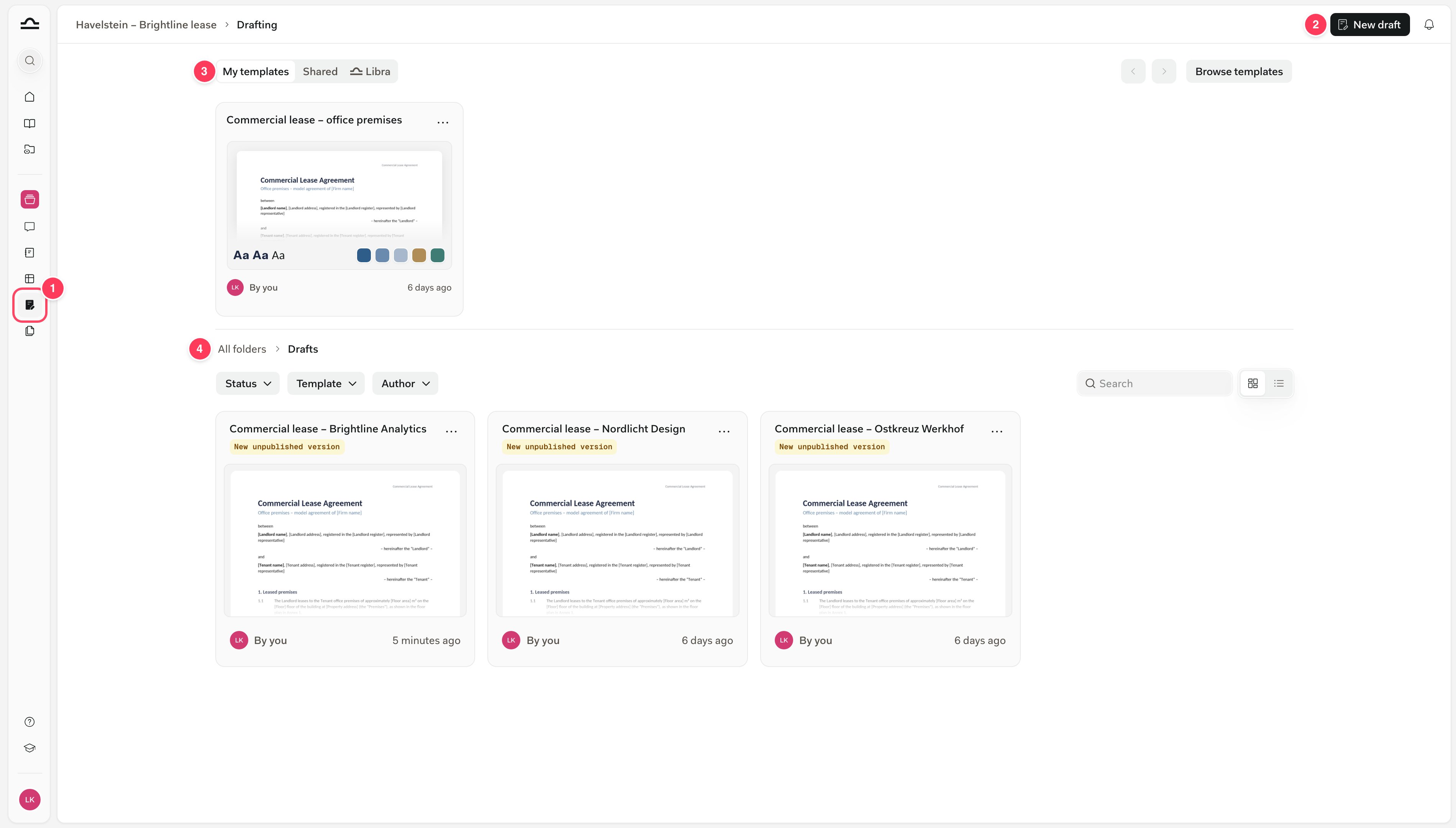
- Drafting in the sidebar opens this page for the project you’re in.
- New draft opens a blank draft in the Editor.
- The templates strip shows your drafting templates under My templates, the ones colleagues shared under Shared, and the ones Libra provides under Libra. Hover one and click Use to start a draft, or click Browse templates for the whole library.
- The drafts: every draft in the project, as a grid or a list, with Status, Template and Author filters. A tag marks anything you haven’t published yet. Drafts live in the project’s Drafts folder in Project files, which takes only
.docxfiles.
Open the Editor
You can open the Editor wherever a Word document appears in Libra. Only.docx files open in the Editor.
Starting from a chat keeps the conversation going. The Editor chat knows what Libra drafted, so “make the termination clause stricter” works straight away. For the chat side, see Word documents from chat.
The Editor, Draft document or the Word add-in?
All three give you a Word document. Pick by where you want to work and how much you’ll change the draft.Common questions
These are the questions lawyers ask first, each with a pointer to the details.Does the Editor replace Word?
Does the Editor replace Word?
No. It’s a streamlined Word inside Libra with the everyday tools: styles, legal numbering, tables, footnotes, headers and footers, tracked changes and comments. Download gives you a
.docx whenever you need Word.Can we use our own templates and house style?
Can we use our own templates and house style?
Yes. Upload your firm’s Word document as a drafting template, and Libra extracts its styles, colours and page setup into a theme. See Templates & Themes.
Does Libra overwrite my document?
Does Libra overwrite my document?
Only where you let it. Select a passage and Libra changes only that passage. In Suggesting mode, every change arrives as a redline you accept or reject. See Work with Libra in the Editor chat.
Can several people work on the same draft?
Can several people work on the same draft?
Yes, one at a time. Colleagues comment and suggest changes, and version history keeps every saved state, but two people can’t edit at once: the last save wins. See Collaboration.
Why doesn't Libra see my latest edits?
Why doesn't Libra see my latest edits?
That depends on where you ask. The Editor chat always reads what’s on your screen. Search, project chat and other chats read the last published version, so click Publish after saving. See Publish.
Can I export to PDF?
Can I export to PDF?
Not from the Editor. Download in the document menu gives you a
.docx, which you can save as a PDF in Word, and Print prints the draft.Next steps
Open your first draft
A tour of the Editor, its formatting tools and working with Libra on the page.
Set up your firm's templates
Turn a model contract into a drafting template in your house style.